

Workflows
The automation engine underneath everything else. Pick a trigger (a booking confirmed, a guest checked out, an arrival tomorrow) and say what should happen. Email the guest, alert whoever needs to know, mark the lodge dirty so the cleaning crew sees it, set a status. Built on a canvas you can read, so the person who set it up is not the only person who understands it.
- Live
- Included in the PMS
- No code needed
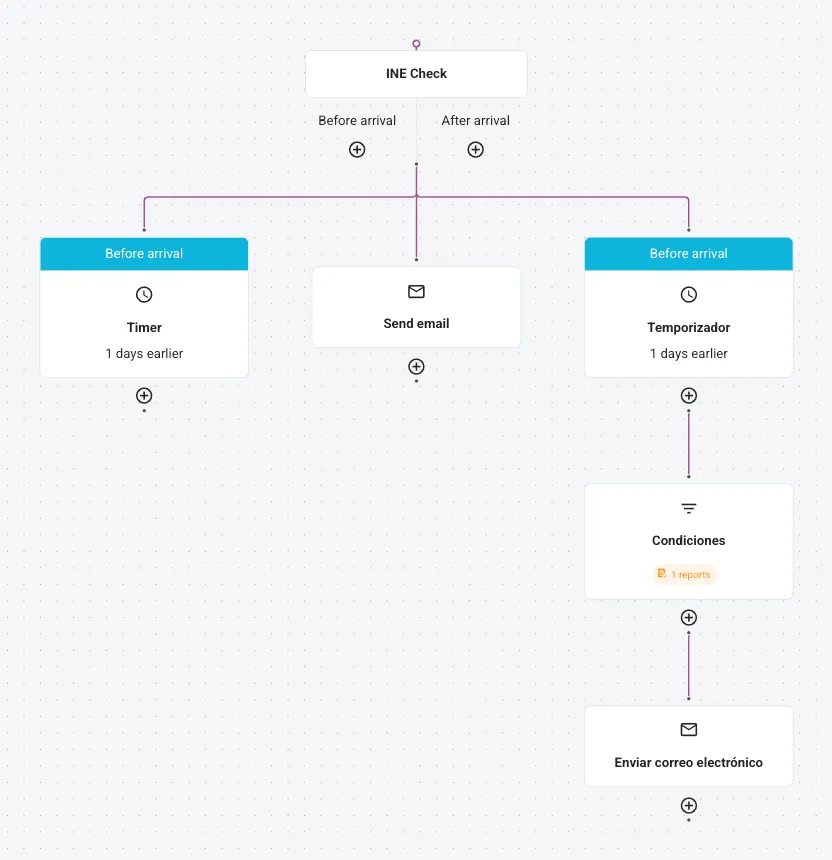
The jobs nobody should have to remember
- TriggerSomething happens in your data
- ActionAnd something follows from it
- Every timeIncluding the busy week
Worked examples, not features
Tell the right person, immediately
A booking above a certain value, a VIP arriving, a group that needs planning around: send yourself or a specific colleague a mail the moment it lands, instead of finding out when you open the arrivals list on the day.
Mark the unit dirty at check-out
A guest checks out and the object's cleaning status changes on its own. The crew sees it on their phone in the free Cleaning App, and reception sees the colour change on the schedule board. Nobody walks anywhere to pass the message on.
The Cleaning App →The email nobody had to write
Arrival information three days out, a payment reminder when a term goes unpaid, a thank-you after departure. Written once, sent in the language on the guest's profile, triggered by the data rather than by somebody's memory.
Start with one, and make it a small one
The temptation with an automation engine is to model your whole season on day one. It goes better the other way round: pick the single thing you are most tired of remembering, build that, and watch it for a week.
Two reasons. A workflow you can read is a workflow you can fix, and a short one is readable. And the emails go to real guests. A mistake in an automation that fires on every confirmed booking reaches everybody before you notice, which is a good argument for building the small one first and the clever one second.
If the clever one turns out to need something the canvas cannot express, the open API can, and so can Otto during onboarding.
Frequently asked
Do I need to be technical?
No. Workflows are built on a canvas: a trigger, then the actions that follow it. There is no code and nothing to deploy.
Can a workflow email me rather than the guest?
Yes, and that is one of the most useful things it does. Send yourself or a named colleague a notification on a high-value booking, a VIP arrival or an urgent task.
Can it change a status?
Yes. Marking an accommodation dirty when the guest checks out is the standard example, and it is what puts the job on the cleaning crew's list without a phone call.
What language do the guest emails go out in?
The language on the guest's profile, so a German family gets German and a Dutch family gets Dutch from the same workflow.
Can I test one before it goes live on real guests?
Build it narrow first (one accommodation type, or a trigger you can create yourself) and widen it once you have seen it fire. It is worth the extra ten minutes.