

Reservations
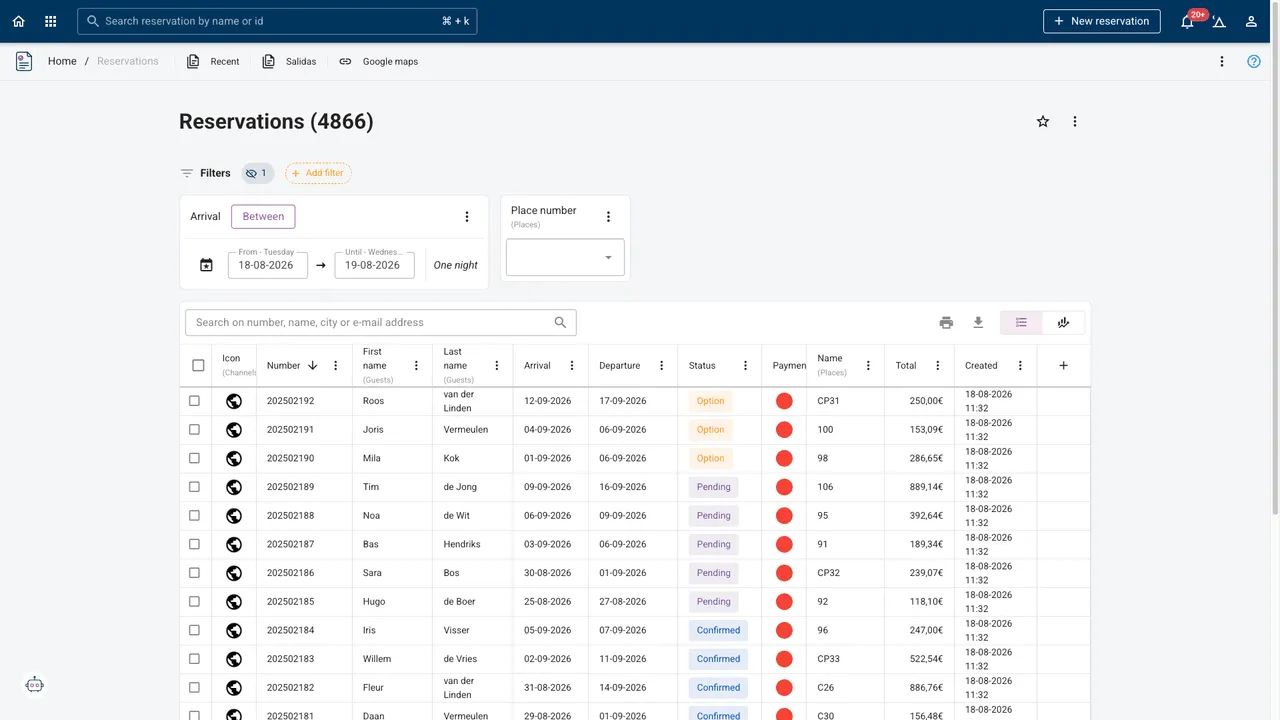
The heart of the system, and the screen your team has open all day. Make a booking, hold it as an option, confirm it, extend the stay by two nights, move the party to another lodge, split it in two, add it to a group, and take the payment on the same screen. Every status change can send the guest an email in their own language, without anyone writing one.
- Live
- Included in the PMS
- On every plan
Fewer screens, fewer mistakes
- 1Record per stay
- GroupBookings that belong together
- ScanA passport instead of a keyboard
- AutoEmails in the guest's language
Where a booking system usually starts fighting you
Plans change, so the booking bends
Shorten or extend a stay, move a party to a different object, split one reservation into two because they want the lodge for the weekend and a pitch for the rest of the week. Copy a booking rather than retyping a returning guest's details.
Options, holds and blocked guests
Hold a pitch as an option with an expiry rather than a confirmation you will have to undo. Keep a blocked-guest list for the party you would rather not host again, and be told before you take the booking, not after they arrive.
Money on the same screen
Add a product, take a payment at the desk, send a payment link, correct a price calculation. The invoice is part of the reservation, so what the guest owes and what they have paid are never two answers.
Lists you actually use
Build a reservation list with the columns and filters you want, save it as a view your team opens every morning, and export it to Excel when somebody wants to look at the season sideways.
Custom fields, and knowing when to use one
Every park asks something the standard form does not: which sports club the group is with, whether the dog is a puppy, the number on the electricity key you handed out. Custom fields exist for exactly that, on the reservation and on the guest.
The one thing worth thinking about first is where the answer belongs. Something true of the guest (dietary requirement, membership number, the fact that they always want the same pitch) goes on the guest, so it comes back with them next year. Something true of this stay goes on the reservation. Putting a stay fact on a guest is the single most common reason a field stops being useful in year two.
Intake forms use the same fields, so what the guest fills in online lands in the field you built rather than in a note nobody reads.
Frequently asked
Can I take a booking without confirming it?
Yes. Hold it as an option, with an expiry date, and the pitch stays out of the availability until it lapses or you confirm it.
How do group bookings work?
Reservations can be added to a group, and two separate bookings can be combined into one. Cancelling one member of a group leaves the rest of the party alone.
Are guest emails automatic?
Yes, driven by the reservation's status, and sent in the language on the guest's profile. You can also write one by hand from the guest's profile when a stay needs a human sentence.
Can I scan a passport at check-in?
Yes. The document scanner fills the guest profile from an ID document, which speeds up the desk and gets names spelled the way your registration report needs them.
Can I fix a price that calculated wrongly?
Yes, on the reservation itself, and the invoice follows. There is a guide for the usual causes. Most of them turn out to be a rate condition rather than a bug.
Which plan includes it?
Every one. Reservations is the core of the PMS.